Prompt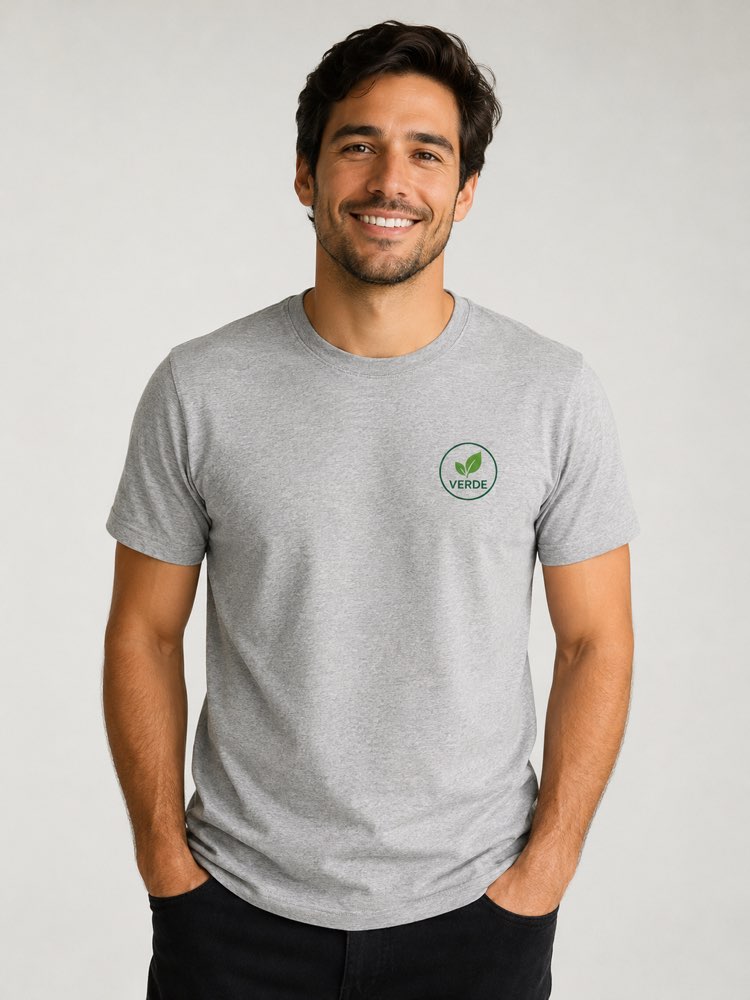
T-Shirt Mockup with Your Logo on a Real Person
Prompt
{
"version": "1.0",
"subject": {
"reference_image": "user_logo",
"preserve_logo": true,
"preserve_colors": true,
"do_not_redraw_logo": true,
"note": "print the exact uploaded logo on the garment chest area"
},
"task": "apparel mockup on a real person",
"garment": {
"type": "premium cotton t-shirt",
"color": "heather grey",
"fit": "relaxed modern",
"print_placement": "left chest + optional large back print"
},
"model": {
"generic_fictional_person": true,
"expression": "friendly confident",
"pose": "natural, hands relaxed",
"diversity": "neutral"
},
"scene": {
"aspect_ratio": "3:4",
"background": "minimal studio or urban brand setting",
"color_palette": "neutral, on-brand"
},
"composition": {
"framing": "waist-up",
"center_subject": true,
"negative_space": true
},
"lighting": {
"style": "soft studio softbox",
"direction": "front-side",
"shadows": "soft"
},
"quality": {
"style": [
"apparel mockup",
"commercial photography",
"photorealistic",
"natural fabric folds",
"true-to-color print",
"sharp focus",
"realistic skin texture"
]
},
"negative_prompt": [
"AI artifacts",
"low quality",
"low resolution",
"blurry",
"oversaturated colors",
"plastic look",
"warped text",
"gibberish text",
"distorted logo",
"extra objects",
"watermark",
"stock photo watermark",
"harsh unnatural shadows",
"fake lighting",
"cluttered background",
"deformed geometry",
"incorrect perspective"
]
}
How to use
This t-shirt mockup prompt prints your logo on a garment worn by a real person, creating the right image for a team uniform, a giveaway or a brand merch shop, and it works in NanoBanana, in Gemini and in ChatGPT. 1) Send the image of your logo along with the JSON prompt in the same message. 2) The AI generates a generic fictional person wearing the t-shirt with your logo printed on the chest. 3) Adjust the garment in "garment" (type, colour and fit) and the position of the artwork in "print_placement". 4) Set the setting in "background", between a minimal studio and an urban brand space. 5) Keep "preserve_logo" and "do_not_redraw_logo" so the AI does not redraw or distort the logo. 6) Generate variations and pick the one with the most natural fabric folds. Tip: send the logo with a transparent background so the print blends better into the fabric of the t-shirt.
Works with
ChatGPT
Gemini
NanoBanana
Rate this prompt
📖 From the Prompteiro blog
See all posts →
Job Interview Simulator With AI: How to RehearseText · September 24, 2026

Travel Itineraries With AI: The Guide That WorksText · September 21, 2026

Travel Photo Prompts: You Anywhere in the WorldImages · September 19, 2026

Professional Product Photos With AI: The GuideImages · September 15, 2026

How to Care for Plants With AI: A Black Thumb’s GuideText · September 14, 2026

Decorate Your Home With AI: From Photo to PlanImages · September 11, 2026

Try a Haircut With AI Before You Actually CutImages · September 9, 2026

Colourise Black and White Photos With AI: A GuideImages · September 7, 2026

AI Headshots for LinkedIn: The Complete GuideImages · September 4, 2026