 Prompt

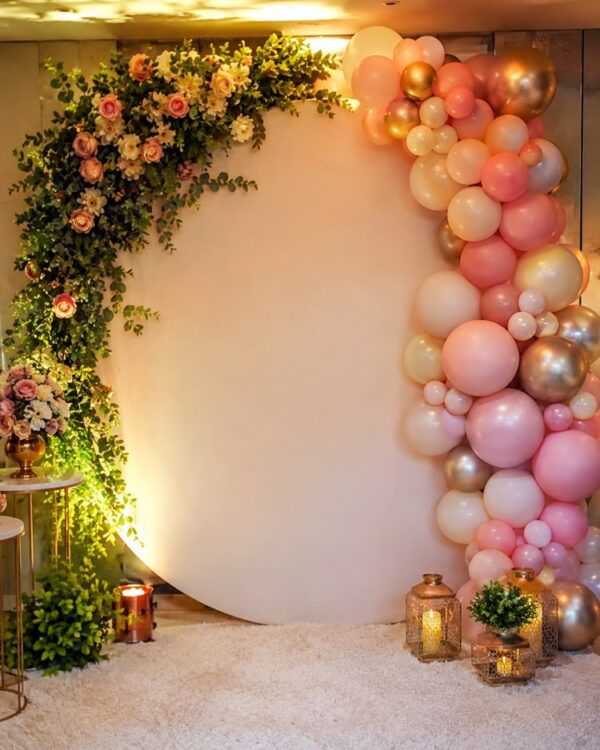
Backdrop for the Photo Corner
Prompt
{
"instruction": "Generate a reference/inspiration image to show your vendor.",
"description": "A wedding photo backdrop shaped as a floral wall, covered in white roses, hydrangeas and dense green foliage, with a rounded arch frame. A light wooden floor in front and soft studio light bringing out the flowers. A setting for the guests’ photo corner, with no lettering or names on the backdrop.",
"preserve": "focus on the composition and the decor",
"style": "Realistic wedding photography, soft romantic light, high definition, 3:4 (portrait) ratio.",
"negative": "no distorted faces, no text, no watermark, no real brand logos"
}
How to use
Want a photo corner everyone will want to be in? This prompt generates a reference image of the backdrop for you to show your decorator. It runs in Gemini, in NanoBanana and in ChatGPT. 1. Paste the prompt into the chat and generate the first floral backdrop with roses and hydrangeas. 2. Look at the arched frame, the density of the flowers and the floor in front. 3. Swap the flowers and the colours in the description to match your palette. 4. Try versions with neon, draped fabric or lots of foliage. 5. Adjust the shape of the backdrop until it fits the space of the party. 6. Download the images that best represent your idea. Final tip: take the references to your decorator to build the photo corner; a good backdrop yields lovely keepsakes from the guests all night long.
Works with
ChatGPT
Gemini
NanoBanana
Rate this prompt
📖 From the Prompteiro blog
See all posts →
Prompts for Learning Spanish: What to Ask DailyText · November 10, 2026

Cooking With What You Have: The MethodText · October 24, 2026

Instagram Prompts: What to Ask for Each FormatText · October 11, 2026

Prompts for Kids’ Photos: The Honest GuideImages · October 4, 2026

Party Decoration With AI: From Theme to BudgetImages · October 1, 2026

Job Interview Simulator With AI: How to RehearseText · September 24, 2026

Travel Itineraries With AI: The Guide That WorksText · September 21, 2026

Travel Photo Prompts: You Anywhere in the WorldImages · September 19, 2026

Professional Product Photos With AI: The GuideImages · September 15, 2026