Prompt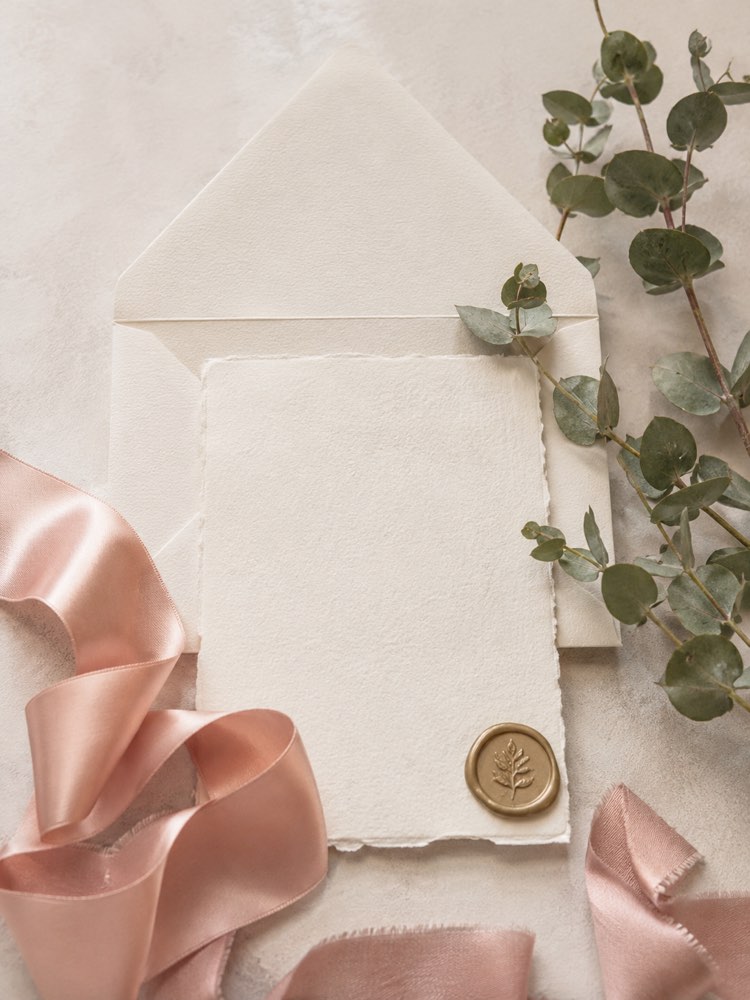
Wedding Invitation and Stationery with AI
Prompt
{
"instruction": "Generate a reference/inspiration image to show your vendor.",
"description": "Flat lay composition of wedding stationery with an invitation on textured ivory paper, an envelope in the same tone, a rose satin ribbon, a beige wax seal and sprigs of eucalyptus alongside. Seen from above on a light surface, soft natural light. Leave the cards blank, with no lettering, focusing on the texture and the colours.",
"preserve": "focus on the composition and the decor",
"style": "Realistic wedding photography, soft romantic light, high definition, 3:4 (portrait) ratio.",
"negative": "no distorted faces, no text, no watermark, no real brand logos"
}
How to use
Want to explain the wedding stationery to your designer without going in circles? This prompt generates a reference image of the invitation for you to show the vendor. It runs in Gemini, in NanoBanana and in ChatGPT. 1. Paste the prompt into the chat and generate the first flat lay with invitation, envelope and wax seal. 2. Look at the colours, the kind of paper and the eucalyptus details. 3. Swap the palette and the elements in the description, such as dried flowers or golden touches. 4. Generate a classic, a boho and a minimalist version to compare. 5. Adjust the format and the paper texture until you reach the style you want. 6. Download the images that suit your invitation best. Final tip: take the references to the stationery designer; from them they will create the final artwork with your names and your details.
Works with
ChatGPT
Gemini
NanoBanana
Rate this prompt
📖 From the Prompteiro blog
See all posts →
ChatGPT or Gemini: Which Is Better for Each TaskCourses · August 5, 2026
Best ChatGPT Prompts in English: 12 to Use TodayText · August 2, 2026
Restore an Old Photo with AI: The Complete Free GuideImages · August 2, 2026

How to Write a Prompt That Works in ChatGPTCourses · August 2, 2026
AI Prompts for Work and Career: 12 That Actually HelpText · August 1, 2026
How to Write an Image Prompt That Works (With Examples)Images · August 1, 2026
What Is Artificial Intelligence: The Beginner’s GuideCourses · August 1, 2026