Prompt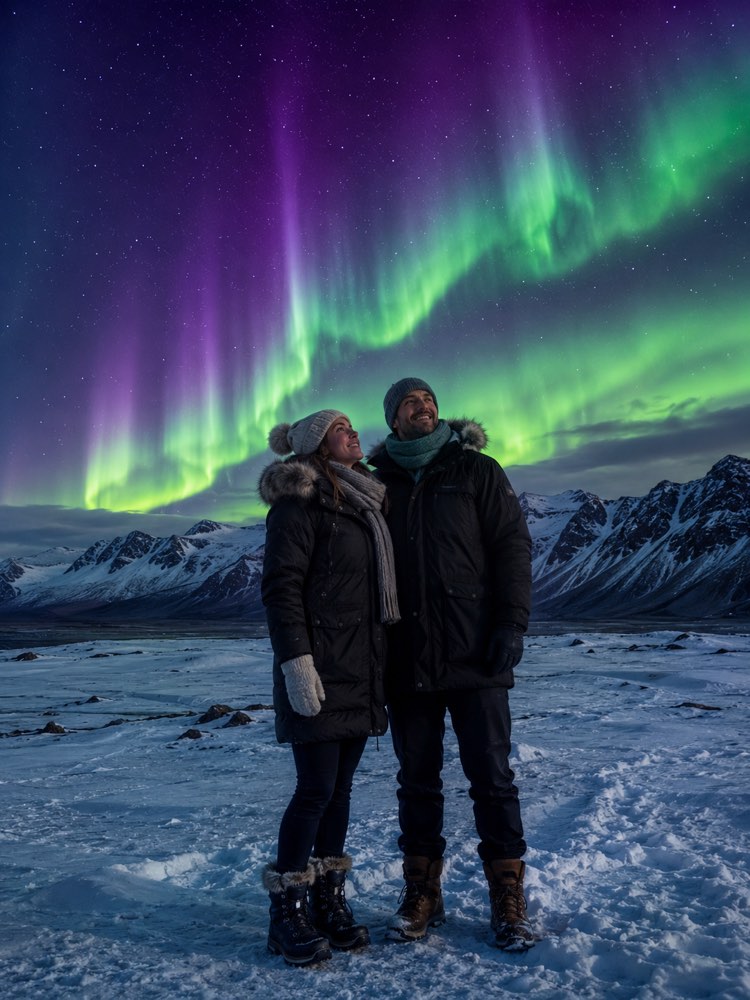
You Under the Northern Lights in Iceland with AI
Prompt
{
"version": "1.0",
"subject": {
"reference_image": "",
"preserve_face": true,
"preserve_identity": true,
"keep_skin_tone": true,
"keep_hairstyle": true,
"outfit": "clothes for intense cold, a heavy parka, a wool hat, a thick scarf, gloves and snow boots"
},
"scene": {
"location": "in an open snowy field in Iceland, with dark mountains in the background and fresh snow on the ground",
"time_of_day": "night",
"background": "a sky taken over by green and violet northern lights rippling above the snowy mountains",
"weather": "a freezing clear night, snow on the ground, biting winter air"
},
"style": {
"look": "realistic travel photo, top-of-the-range phone camera quality",
"lighting": "the greenish glow of the aurora lighting up the snow, cold magical night light",
"framing": "full body, the person standing in the snow looking up at the sky with the aurora above",
"mood": "magical and sublime, an arctic dream feel"
},
"negative_prompt": "faces of other famous people, commercial brands, logos, text, facial distortion, deformed hands, looking like bad photoshop",
"instructions": "Preserve 100% of the face and the identity of the person in the photo sent. Only place the person realistically in the scene, adjusting light, shadow and clothing to the setting."
}
How to use
A photo of yourself under the northern lights in Iceland sounds impossible, but this prompt makes the composite and it works in Gemini, in NanoBanana and in ChatGPT. 1. Set aside a sharp photo of yourself, with the face well lit and the whole body if you can, for more fidelity. 2. Open the AI you chose and send that image in the same message where you will paste the prompt. 3. Copy the whole prompt from this card and paste it below the photo, without touching the JSON keys. 4. Check that the request to preserve 100% of the face and the identity is still in the text before you send it. 5. Generate the image and ask for variations by changing the "outfit" or the colours of the aurora to more violet or bluish tones. 6. Compare the results and save the best one in high quality. Tip: a heavy, cosy coat makes the cold scene far more convincing.
Works with
ChatGPT
Gemini
NanoBanana
Rate this prompt
📖 From the Prompteiro blog
See all posts →
ChatGPT or Gemini: Which Is Better for Each TaskCourses · August 5, 2026

Best ChatGPT Prompts in English: 12 to Use TodayText · August 2, 2026

Restore an Old Photo with AI: The Complete Free GuideImages · August 2, 2026

How to Write a Prompt That Works in ChatGPTCourses · August 2, 2026

AI Prompts for Work and Career: 12 That Actually HelpText · August 1, 2026

How to Write an Image Prompt That Works (With Examples)Images · August 1, 2026

What Is Artificial Intelligence: The Beginner’s GuideCourses · August 1, 2026