Prompt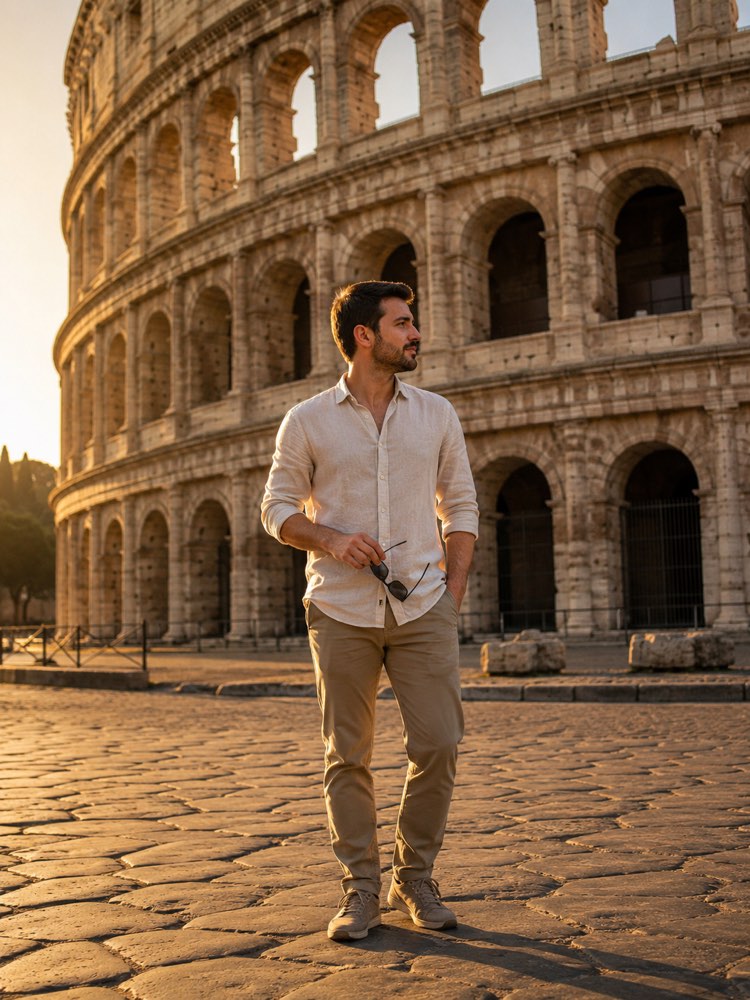
Photo at the Colosseum in Rome: You in Italy
Prompt
{
"version": "1.0",
"subject": {
"reference_image": "",
"preserve_face": true,
"preserve_identity": true,
"keep_skin_tone": true,
"keep_hairstyle": true,
"outfit": "a European summer look, a light linen shirt, sunglasses in hand, light trousers and walking trainers"
},
"scene": {
"location": "in front of the Colosseum in Rome, Italy, with the ancient stone paving and the arched architecture of the amphitheatre",
"time_of_day": "late afternoon, golden hour",
"background": "the monumental facade of the Colosseum filling the background, golden stone lit by the low sun",
"weather": "a clear sky in orange tones, the mild warmth of late afternoon"
},
"style": {
"look": "a realistic travel photo, top-of-the-range phone camera quality",
"lighting": "warm golden late-afternoon light, soft backlight",
"framing": "half body to full body, the person in the foreground with the monument behind",
"mood": "historic and grand, a cultural adventure feel"
},
"negative_prompt": "faces of other famous people, commercial brands, logos, text, facial distortion, deformed hands, looking like a bad photo edit",
"instructions": "Preserve the face and the identity of the person in the photo sent 100%. Only place the person realistically into the scene, adjusting light, shadow and clothing to the setting."
}
How to use
Always wanted a photo at the Colosseum in Rome? This prompt places you in front of the amphitheatre, under the golden late-afternoon light, and it runs in Gemini, in NanoBanana and in ChatGPT. 1. Pick a well-lit, sharp photo of yourself, showing the face clearly and, if possible, the whole body. 2. Open the AI tool and attach that image in the same message as the prompt. 3. Paste the full prompt from this card below the photo, keeping the JSON exactly as it is. 4. Check that the request to preserve the face and the identity 100% is still in the text before generating. 5. Send it and, when the result arrives, ask for variations by changing the "outfit" or moving the time to midday. 6. Compare the versions and save the one that came out most realistic. Tip: photos with good natural light make it easier for the AI to adjust the shadows in the scene.
Works with
ChatGPT
Gemini
NanoBanana
Rate this prompt
📋 Featured in these lists

📖 From the Prompteiro blog
See all posts →
Job Interview Simulator With AI: How to RehearseText · September 24, 2026

Travel Itineraries With AI: The Guide That WorksText · September 21, 2026

Professional Product Photos With AI: The GuideImages · September 15, 2026

How to Care for Plants With AI: A Black Thumb’s GuideText · September 14, 2026

Decorate Your Home With AI: From Photo to PlanImages · September 11, 2026

Try a Haircut With AI Before You Actually CutImages · September 9, 2026

Colourise Black and White Photos With AI: A GuideImages · September 7, 2026

AI Headshots for LinkedIn: The Complete GuideImages · September 4, 2026

Pet Photo Prompts: How to Get It Right First TimeImages · September 1, 2026