Prompt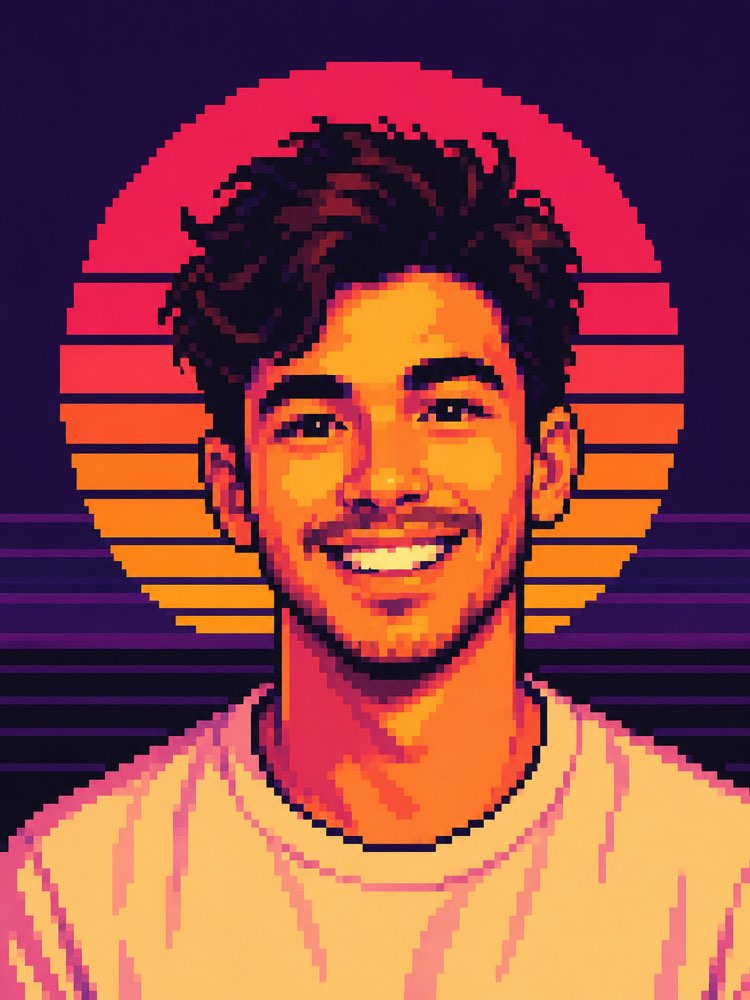
Synthwave Pixel Art Portrait with AI
Prompt
{
"task": "photo_transformation",
"version": "1.0",
"prompt": {
"preserve_identity": {
"enabled": true,
"priority": "maximum",
"face": {
"keep_face_shape": true,
"keep_eyes": true,
"keep_nose": true,
"keep_mouth": true,
"keep_expression": true,
"keep_age": true,
"keep_gender_presentation": true,
"keep_skin_tone_relationship": true,
"recognizable_as_same_person": true
},
"hair": {
"preserve_general_shape": true,
"preserve_hairline": true,
"allow_pixel_art_simplification": true
}
},
"style": {
"name": "retro_pixel_art_synthwave",
"description": "Transform the uploaded portrait into high-quality retro pixel art inspired by 16-bit and early 90s computer graphics, using large visible pixels, limited color palette, bold outlines, stylized shading, and vibrant synthwave aesthetics.",
"pixel_art": {
"true_pixel_art": true,
"visible_pixel_grid": true,
"large_pixel_blocks": true,
"manual_pixel_cluster_feel": true,
"no_ai_painterly_effect": true,
"no_smooth_brushes": true,
"no_vector_style": true,
"limited_palette": true,
"palette_size": "24-40 colors",
"hard_edges": true,
"crisp_blocks": true
},
"outline": {
"dark_outline": true,
"outline_color": "#1a1224",
"outline_weight": "2-4 pixels"
},
"shading": {
"flat_shading": true,
"2_to_4_tones_per_region": true,
"pixel_dithering": "minimal",
"high_contrast": true
},
"overall_feel": [
"retro",
"arcade",
"1980s",
"1990s",
"synthwave",
"outrun",
"nostalgic",
"clean pixel art"
]
},
"composition": {
"crop": "portrait",
"aspect_ratio": "2:3",
"framing": "head_and_shoulders",
"camera_angle": "straight_on",
"head_position": "centered",
"eye_level": true,
"subject_centered": true,
"maintain_original_pose": true,
"maintain_original_expression": true,
"allow_small_adjustments_for_symmetry": true
},
"background": {
"replace_background": true,
"description": "Classic synthwave sunset with a large circular striped sun centered behind the person's head.",
"elements": {
"sun": {
"large": true,
"striped": true,
"gradient": [
"#ff1f5a",
"#ff5b3a",
"#ff9d2f"
]
},
"sky": {
"deep_purple": true,
"solid_color": "#24153d"
},
"horizon": {
"horizontal_neon_lines": true,
"purple_layers": true,
"dark_foreground": true
}
},
"symmetrical": true,
"minimal": true
},
"lighting": {
"style": "stylized_synthwave",
"primary_light": "front",
"secondary_light": "warm_sunset",
"contrast": "high",
"colors": [
"#ffea9a",
"#ffcb5c",
"#ff8a52",
"#ff5076"
],
"soft_pixel_shading": true,
"no_realistic_global_illumination": true
},
"colors": {
"dominant_palette": [
"#201235",
"#38205f",
"#ff1f5a",
"#ff5a42",
"#ff9c30",
"#ffd15b",
"#ffe6a0"
],
"saturation": "high",
"contrast": "high",
"warm_skin": true,
"deep_purple_shadows": true,
"neon_highlights": true
},
"subject": {
"clothing": {
"simplify_into_pixel_art": true,
"retain_general_style": true,
"reduce_small_details": true
},
"accessories": {
"preserve_if_present": true,
"simplify": true
}
},
"facial_rendering": {
"simplified_but_recognizable": true,
"pixelated_eyes": true,
"pixelated_eyebrows": true,
"pixelated_nose": true,
"pixelated_lips": true,
"minimal_but_readable_features": true
},
"quality": {
"high_quality_pixel_art": true,
"professionally_designed_sprite_style": true,
"clean_edges": true,
"consistent_pixel_size": true,
"no_jagged_random_noise": true,
"balanced_palette": true,
"high_readability": true,
"game_ready_visual_quality": true
},
"output": {
"resolution": "1024x1536",
"format": "PNG",
"background": "opaque",
"sharpness": "crisp",
"texture": "pixel_only"
},
"negative_prompt": [
"photorealistic",
"semi-realistic painting",
"oil painting",
"watercolor",
"anime",
"3D render",
"CGI",
"vector art",
"cell shading",
"smooth gradients",
"blur",
"noise",
"film grain",
"low resolution",
"compression artifacts",
"oversaturated bloom",
"lens flare",
"realistic skin pores",
"soft brush strokes",
"extra people",
"cropped head",
"deformed face",
"incorrect facial proportions",
"asymmetrical eyes",
"extra eyes",
"extra ears",
"extra limbs",
"missing facial features",
"floating objects",
"text",
"caption",
"watermark",
"logo",
"signature",
"frame",
"random background objects",
"modern city",
"photographic lighting",
"AI painterly texture"
]
}
}
How to use
The synthwave pixel art prompt turns your portrait into 16-bit graphics with large visible pixels, a limited palette and that striped sun behind your head. It works in NanoBanana, in Gemini and in ChatGPT. 1. Send a sharp photo of your face together with the JSON prompt, in the same message. 2. Keep the pixel size as it is: it is what stops the AI from making a smooth illustration. 3. Adjust the sunset palette if you want another mood. 4. Set the number of colours — the fewer, the more period-accurate the result. 5. Generate variations of the background and compare the striped sun. 6. Save the version where the face is still readable at a small size. Tip: pixel art lives on the limited palette, so resist asking for more colours when the face looks rough.
Works with
ChatGPT
Gemini
NanoBanana
Rate this prompt
📖 From the Prompteiro blog
See all posts →
Job Interview Simulator With AI: How to RehearseText · September 24, 2026

Travel Itineraries With AI: The Guide That WorksText · September 21, 2026

Travel Photo Prompts: You Anywhere in the WorldImages · September 19, 2026

Professional Product Photos With AI: The GuideImages · September 15, 2026

How to Care for Plants With AI: A Black Thumb’s GuideText · September 14, 2026

Decorate Your Home With AI: From Photo to PlanImages · September 11, 2026

Try a Haircut With AI Before You Actually CutImages · September 9, 2026

Colourise Black and White Photos With AI: A GuideImages · September 7, 2026

AI Headshots for LinkedIn: The Complete GuideImages · September 4, 2026