 Prompt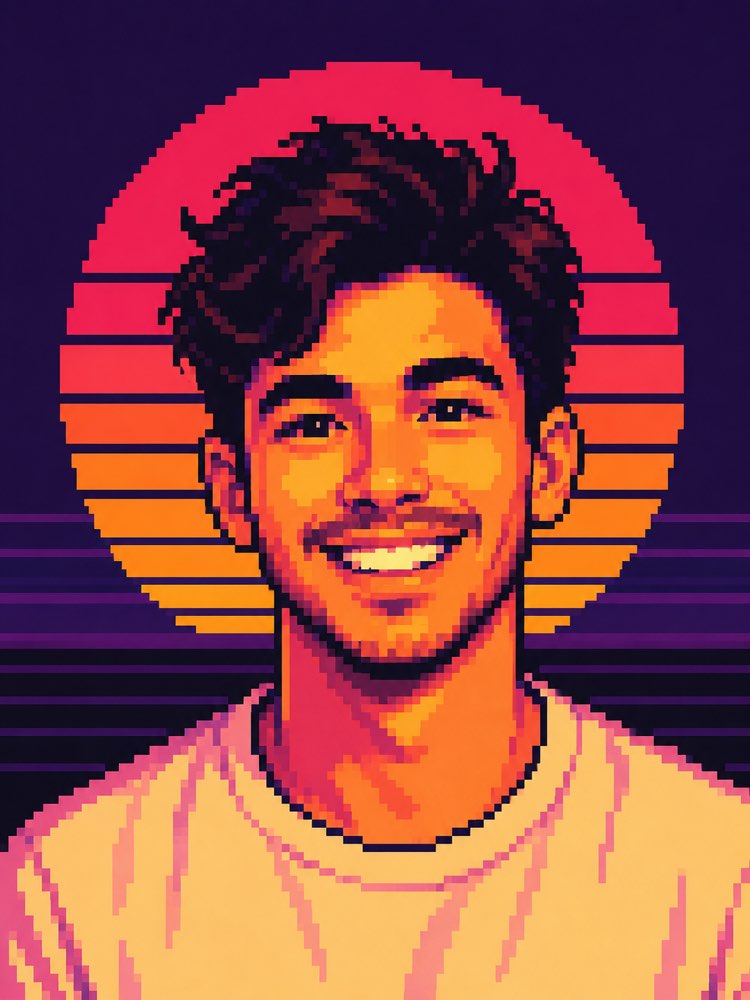
Retrato en Pixel Art Synthwave con IA
Prompt
{
"task": "photo_transformation",
"version": "1.0",
"prompt": {
"preserve_identity": {
"enabled": true,
"priority": "máximo",
"face": {
"keep_face_shape": true,
"keep_eyes": true,
"keep_nose": true,
"keep_mouth": true,
"keep_expression": true,
"keep_age": true,
"keep_gender_presentation": true,
"keep_skin_tone_relationship": true,
"recognizable_as_same_person": true
},
"hair": {
"preserve_general_shape": true,
"preserve_hairline": true,
"allow_pixel_art_simplification": true
}
},
"style": {
"name": "retro_pixel_art_synthwave",
"description": "Transforma el retrato enviado en pixel art retro de alta calidad, inspirado en los gráficos de 16 bits y de comienzos de los 90, con píxeles grandes y visibles, paleta limitada, contornos marcados, sombreado estilizado y una estética synthwave vibrante.",
"pixel_art": {
"true_pixel_art": true,
"visible_pixel_grid": true,
"large_pixel_blocks": true,
"manual_pixel_cluster_feel": true,
"no_ai_painterly_effect": true,
"no_smooth_brushes": true,
"no_vector_style": true,
"limited_palette": true,
"palette_size": "24-40 colors",
"hard_edges": true,
"crisp_blocks": true
},
"outline": {
"dark_outline": true,
"outline_color": "#1a1224",
"outline_weight": "2-4 pixels"
},
"shading": {
"flat_shading": true,
"2_to_4_tones_per_region": true,
"pixel_dithering": "mínimo",
"high_contrast": true
},
"overall_feel": [
"retro",
"arcade",
"años 80",
"años 90",
"synthwave",
"outrun",
"nostálgico",
"pixel art limpio"
]
},
"composition": {
"crop": "retrato",
"aspect_ratio": "2:3",
"framing": "head_and_shoulders",
"camera_angle": "straight_on",
"head_position": "centrado",
"eye_level": true,
"subject_centered": true,
"maintain_original_pose": true,
"maintain_original_expression": true,
"allow_small_adjustments_for_symmetry": true
},
"background": {
"replace_background": true,
"description": "Atardecer synthwave clásico con un gran sol circular a rayas centrado detrás de la cabeza de la persona.",
"elements": {
"sun": {
"large": true,
"striped": true,
"gradient": [
"#ff1f5a",
"#ff5b3a",
"#ff9d2f"
]
},
"sky": {
"deep_purple": true,
"solid_color": "#24153d"
},
"horizon": {
"horizontal_neon_lines": true,
"purple_layers": true,
"dark_foreground": true
}
},
"symmetrical": true,
"minimal": true
},
"lighting": {
"style": "stylized_synthwave",
"primary_light": "frontal",
"secondary_light": "warm_sunset",
"contrast": "alto",
"colors": [
"#ffea9a",
"#ffcb5c",
"#ff8a52",
"#ff5076"
],
"soft_pixel_shading": true,
"no_realistic_global_illumination": true
},
"colors": {
"dominant_palette": [
"#201235",
"#38205f",
"#ff1f5a",
"#ff5a42",
"#ff9c30",
"#ffd15b",
"#ffe6a0"
],
"saturation": "alto",
"contrast": "alto",
"warm_skin": true,
"deep_purple_shadows": true,
"neon_highlights": true
},
"subject": {
"clothing": {
"simplify_into_pixel_art": true,
"retain_general_style": true,
"reduce_small_details": true
},
"accessories": {
"preserve_if_present": true,
"simplify": true
}
},
"facial_rendering": {
"simplified_but_recognizable": true,
"pixelated_eyes": true,
"pixelated_eyebrows": true,
"pixelated_nose": true,
"pixelated_lips": true,
"minimal_but_readable_features": true
},
"quality": {
"high_quality_pixel_art": true,
"professionally_designed_sprite_style": true,
"clean_edges": true,
"consistent_pixel_size": true,
"no_jagged_random_noise": true,
"balanced_palette": true,
"high_readability": true,
"game_ready_visual_quality": true
},
"output": {
"resolution": "1024x1536",
"format": "PNG",
"background": "opaco",
"sharpness": "nítido",
"texture": "pixel_only"
},
"negative_prompt": [
"fotorrealista",
"pintura semirrealista",
"pintura al óleo",
"acuarela",
"anime",
"render 3D",
"CGI",
"arte vectorial",
"cel shading",
"degradados suaves",
"desenfoque",
"ruido",
"grano de película",
"baja resolución",
"artefactos de compresión",
"bloom sobresaturado",
"destello de lente",
"poros de piel realistas",
"pinceladas suaves",
"personas de más",
"cabeza cortada",
"rostro deformado",
"proporciones faciales incorrectas",
"ojos asimétricos",
"ojos de más",
"orejas de más",
"miembros de más",
"rasgos faciales que faltan",
"objetos flotando",
"texto",
"leyenda",
"marca de agua",
"logo",
"firma",
"marco",
"objetos de fondo al azar",
"ciudad moderna",
"iluminación fotográfica",
"textura pictórica de IA"
]
}
}
Cómo usar
El prompt de pixel art synthwave convierte tu retrato en gráficos de 16 bits con píxeles grandes y visibles, paleta limitada y ese sol a rayas detrás de tu cabeza. Funciona en NanoBanana, en Gemini y en ChatGPT. 1. Envía una foto nítida de tu rostro junto con el prompt JSON, en el mismo mensaje. 2. Mantén el tamaño de píxel como está: es lo que impide que la IA haga una ilustración suave. 3. Ajusta la paleta del atardecer si quieres otro ambiente. 4. Define el número de colores; cuantos menos, más fiel a la época queda el resultado. 5. Genera variaciones del fondo y compara el sol a rayas. 6. Guarda la versión en la que el rostro siga siendo legible en tamaño pequeño. Consejo: el pixel art vive de la paleta limitada, así que resiste la tentación de pedir más colores cuando el rostro parezca tosco.
Funciona con
ChatGPT
Gemini
NanoBanana
Valora este prompt
📖 Del blog de Prompteiro
Ver todos los artículos →
ChatGPT o Gemini: cuál es mejor para cada tareaCursos · 5 de agosto de 2026

Mejores prompts para ChatGPT en español: 12 para usar hoyTexto · 2 de agosto de 2026

Restaurar foto antigua con IA: la guía completa y gratisImágenes · 2 de agosto de 2026

Cómo escribir un prompt que funciona en ChatGPTCursos · 2 de agosto de 2026

Prompts de IA para trabajo y carrera: 12 que resuelvenTexto · 1 de agosto de 2026

Cómo escribir un prompt de imagen que funcione (con ejemplos)Imágenes · 1 de agosto de 2026

Qué es la inteligencia artificial: la guía para principiantesCursos · 1 de agosto de 2026