Prompt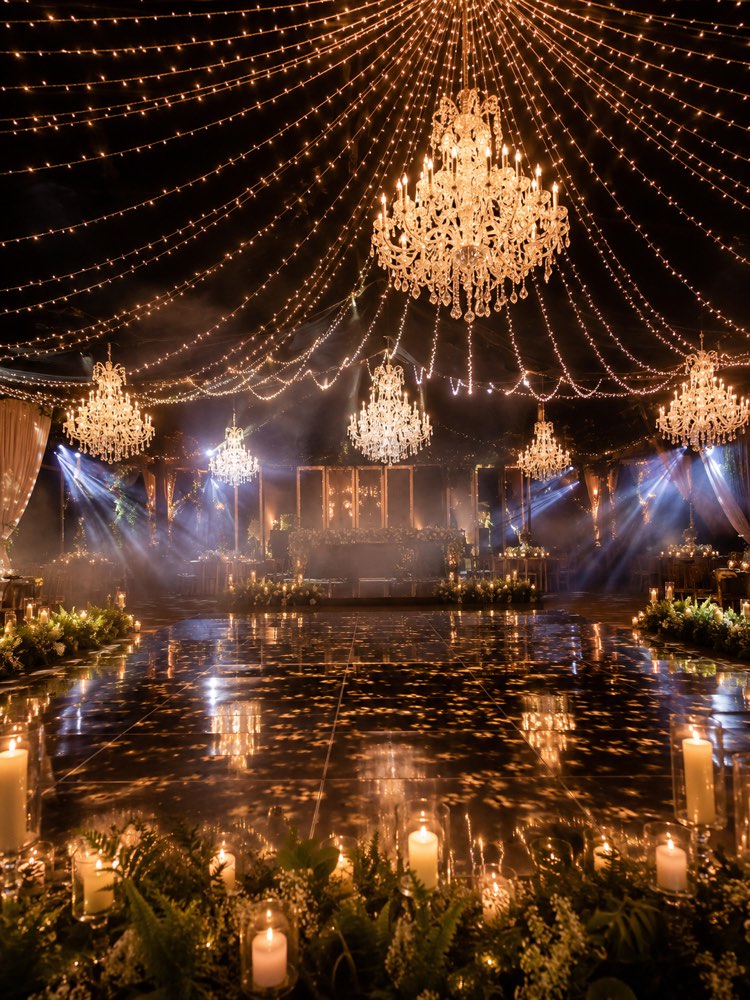
Lighting and Dance Floor with AI
Prompt
{
"instruction": "Generate a reference/inspiration image to show your vendor.",
"description": "A wedding dance floor at night with curtains of golden string lights hanging from the ceiling, crystal chandeliers suspended and a path of candles all around. A reflective floor, an elegant and festive setting with warm, cosy light, a light haze in the air creating a romantic atmosphere. No people on the floor, the focus on the lighting and the space.",
"preserve": "focus on the composition and the decor",
"style": "Realistic wedding photography, soft romantic light, high definition, 3:4 (portrait) ratio.",
"negative": "no distorted faces, no text, no watermark, no real brand logos"
}
How to use
The right lighting transforms the dance floor. This prompt generates a reference image for you to show your light and sound vendor. It works in Gemini, in NanoBanana and in ChatGPT. 1. Paste the prompt into the chat and generate the first floor with curtains of golden string lights and chandeliers. 2. Look at the mood: reflective floor, candles all around and a light haze in the air. 3. Adjust the kind of light in the description to neon, a light curtain or crystal chandeliers. 4. Swap the colours to match the mood you want, more romantic or more festive. 5. Generate versions for the ceremony and for the party. 6. Download the images that convey the atmosphere you are after. Final tip: send the references to your lighting vendor; that way they bring the right equipment and the floor turns out exactly as you pictured it.
Works with
ChatGPT
Gemini
NanoBanana
Rate this prompt
📖 From the Prompteiro blog
See all posts →
Job Interview Simulator With AI: How to RehearseText · September 24, 2026

Travel Itineraries With AI: The Guide That WorksText · September 21, 2026

Travel Photo Prompts: You Anywhere in the WorldImages · September 19, 2026

Professional Product Photos With AI: The GuideImages · September 15, 2026

How to Care for Plants With AI: A Black Thumb’s GuideText · September 14, 2026

Decorate Your Home With AI: From Photo to PlanImages · September 11, 2026

Try a Haircut With AI Before You Actually CutImages · September 9, 2026

Colourise Black and White Photos With AI: A GuideImages · September 7, 2026

AI Headshots for LinkedIn: The Complete GuideImages · September 4, 2026