Prompt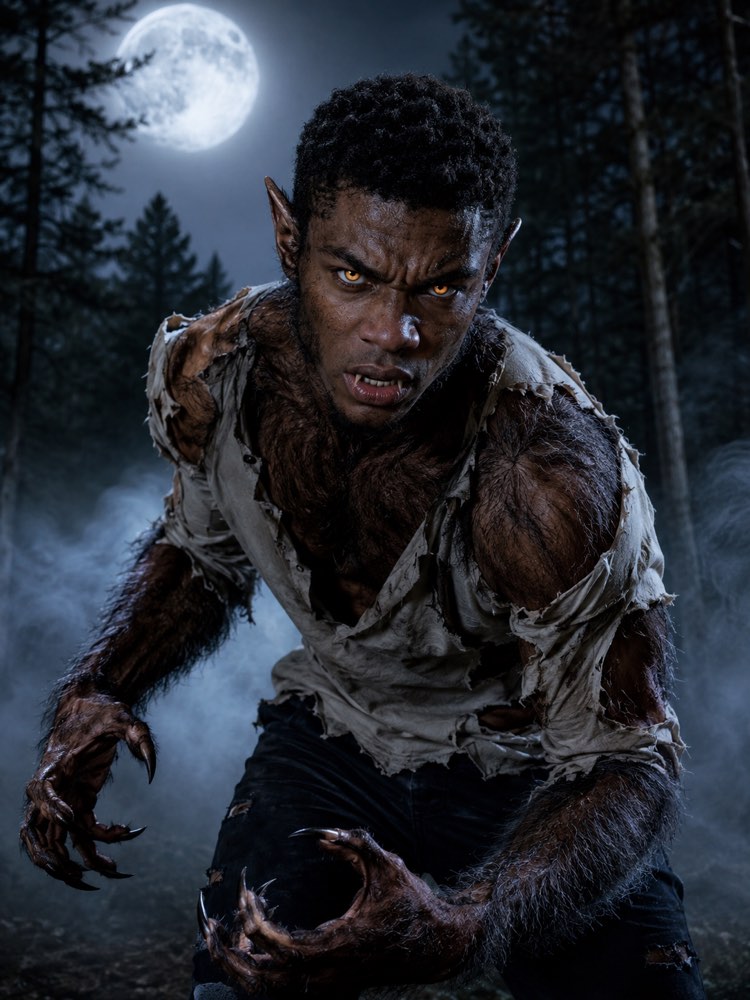
Fierce Werewolf Costume in Your Photo
Prompt
{
"instruction": "Send a photo of your face or your body, in good light, and generate the image preserving your face and your identity completely.",
"costume": "turn the person into a fierce werewolf in a stylised style, with thick fur breaking through the skin in shades of brown and grey, pointed ears, claws on the hands and discreet fangs, a shirt torn at the shoulders as if the transformation were happening; add glowing yellowish eyes and a wild expression, keeping the facial features recognisable, all in generic unbranded clothing",
"preserve": "keep the person's face and features recognisable under the make-up, along with the shape of the body; change only the clothing, the fur and make-up effects and the setting, without deforming the identity",
"setting": "a clearing in a dense forest under the full moon, with tall trees all around, low mist and a silvery moonlight glow washing over the scene",
"style": "Realistic Halloween photography, silvery full-moon lighting, high definition, 3:4 ratio (portrait).",
"negative": "no distorting the face to the point of losing the identity, no explicit blood, no text, no watermark, no logos, no characters from films or real brands"
}
How to use
The fierce werewolf costume is perfect for anyone who wants to make an impression at Halloween, and it works well in Gemini, NanoBanana or ChatGPT. 1. Photograph your face or your body in good light, so the AI keeps your features recognisable. 2. Send the photo together with this full prompt in the image generator you use. 3. Ask it to preserve your face and your identity, adding only the fur, the claws, the torn clothing and the forest setting. 4. In new versions, adjust how thick the fur is, how yellow the eyes glow or how strong the moonlight is. 5. When it is fierce in just the right measure, save it in high resolution. Fun tip: put some care into a roaring pose with the claws on show. Remember you go back to normal off screen, the transformation is only in the image.
Works with
ChatGPT
Gemini
NanoBanana
Rate this prompt
📖 From the Prompteiro blog
See all posts →
Job Interview Simulator With AI: How to RehearseText · September 24, 2026

Travel Itineraries With AI: The Guide That WorksText · September 21, 2026

Travel Photo Prompts: You Anywhere in the WorldImages · September 19, 2026

Professional Product Photos With AI: The GuideImages · September 15, 2026

How to Care for Plants With AI: A Black Thumb’s GuideText · September 14, 2026

Decorate Your Home With AI: From Photo to PlanImages · September 11, 2026

Try a Haircut With AI Before You Actually CutImages · September 9, 2026

Colourise Black and White Photos With AI: A GuideImages · September 7, 2026

AI Headshots for LinkedIn: The Complete GuideImages · September 4, 2026