Prompt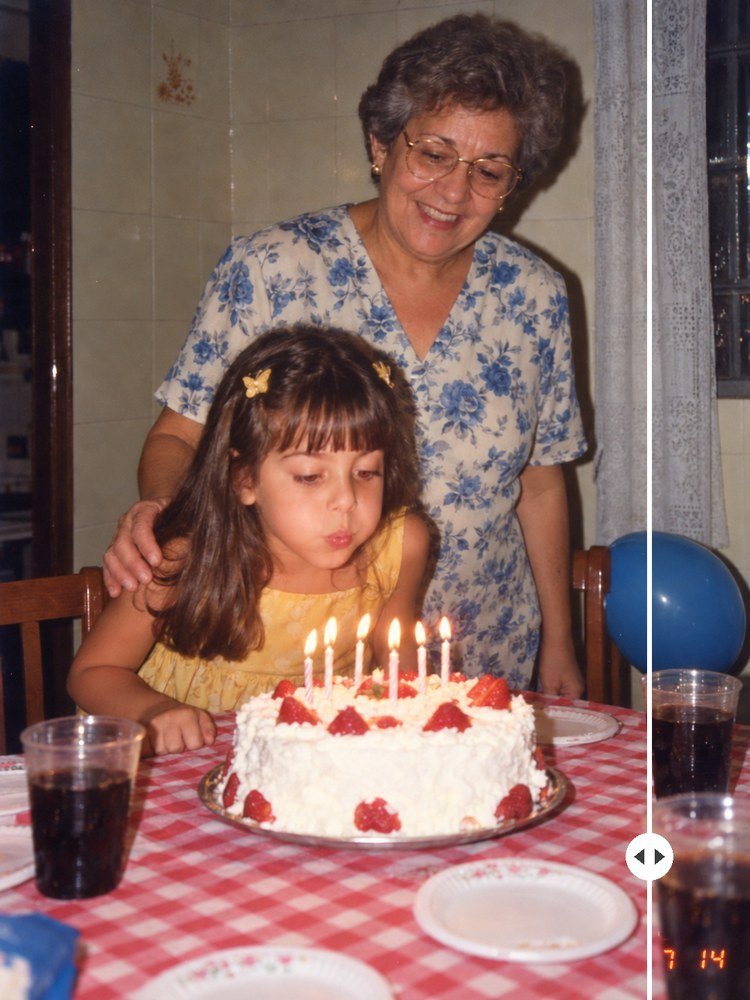
Remove the Date From a Photo With AI, Without Touching the Rest
Prompt
{
"subject": "the uploaded old photo, exactly as it is, only WITHOUT the orange date the camera printed in the bottom right corner ('98 7 14, in seven-segment digits). In the example photo: a girl of about 7, with long brown hair, bangs and two yellow butterfly hair clips, in a yellow dress, blowing out seven little candles on a white cake with strawberries; standing behind her, her grandmother, with short gray hair, gold-rimmed glasses and a blouse with blue flowers, her hand on the girl's shoulder, smiling. Mandatory preservation: the faces, the expressions, the poses, the candles and every object stay identical to the uploaded photo; do not make anyone look younger, do not smooth the skin, do not change features and do not change anyone's hairstyle",
"action": "the only edit is to erase the printed date and rebuild what the digits covered, as if the camera had never printed any date at all. In the example, the date '98 7 14 sat over two things: the '98 fell on the red-and-white check of the tablecloth, and the 7 14 on the dark side of the soda cup in the corner. The tablecloth keeps the same lines and the same size of check as the rest of the table, and the cup keeps the same dark soda, the same bubbles and the same flash reflection. Nothing else changes position, color or sharpness",
"scene": "a birthday party at home, at night, in 1998: a table with a red-and-white checkered tablecloth, plastic cups of dark soda, paper plates with a border of little flowers, a silver platter under the cake and a blue balloon tied to the wooden chair on the right; in the background, a cream tile wall with a flower sticker, a dark wooden door frame on the left and a white lace curtain on the right",
"composition": "the SAME framing as the uploaded photo, with no zooming in, no zooming out, no cropping and no rotating: vertical 3:4 ratio, the grandmother at the top, from the center to the right, the girl in the center, the cake in the bottom third and a cup in each bottom corner; the bottom right corner, where the date was, shows only the tablecloth and the cup",
"camera": "35 mm compact film camera, at the chest height of a standing adult, angled slightly downward, normal lens, focus not quite sharp at the edges, exactly as in the uploaded photo",
"lighting": "direct built-in flash, flat and frontal, with a hard shadow behind the people on the wall and shine on the cups and the glasses, with no light correction at all",
"color_palette": "the colors of the original print, uncorrected: a slight yellow cast, warm reds and yellows a little faded, washed-out blacks; the rebuilt patch in the same red and the same white as the tablecloth next to it, with no trace of orange left",
"style": "a real 1990s family photograph, scanned from a 4 x 6 paper print. This is NOT a restoration: the photo does not get sharper, cleaner or newer, it only loses the date",
"materials": "film grain visible and even across the whole photo, including the rebuilt patch; glossy photo paper with a slight loss of contrast",
"details": "the proof of the edit: in the bottom right corner, no digit, no orange halo, no smudge and no area smoother than the rest of the photo; the check of the tablecloth and the cup look as if the date had never existed; everything else, compared with the uploaded photo, is the same, from the grandmother's face to the butterfly clips",
"negative_prompt": "date, numbers, orange digits, orange halo, smudge where the date was, blur, smooth patch without grain, any text, letters or marks, watermark, logo, restored photo, sharper photo, smoothed skin, altered face, de-aging, corrected colors, different framing, zoom, crop, new object, object removed other than the date, AI artifacts, deformed hands"
}
How to use
The orange date the camera printed in the corner ruins exactly the photo you most want to frame, and cropping the corner cuts off part of the scene. This prompt erases only the date and rebuilds what it covered, without "restoring" the rest: the grain, flash and colors of the print stay the same, and so do the faces. Works in ChatGPT, Gemini and NanoBanana. 1. Scan the whole photo, or photograph it straight on, with no glare. 2. Upload the photo and describe who is in it in the `subject`: that's the block that protects the faces. 3. In the `action`, write what is under the numbers: the AI rebuilds what you name better. 4. Zoom into the corner and compare with the original: no orange left and the same grain as the rest. 5. Check the faces side by side with the original before printing. Tip: it also works for a stamp or a caption written on the front of YOUR photo. A watermark on a photo that isn't yours stays where it is.
Works with
ChatGPT
Gemini
NanoBanana
Rate this prompt
📖 From the Prompteiro blog
See all posts →
Instagram Prompts: What to Ask for Each FormatText · October 11, 2026

Prompts for Kids’ Photos: The Honest GuideImages · October 4, 2026

Party Decoration With AI: From Theme to BudgetImages · October 1, 2026

Job Interview Simulator With AI: How to RehearseText · September 24, 2026

Travel Itineraries With AI: The Guide That WorksText · September 21, 2026

Travel Photo Prompts: You Anywhere in the WorldImages · September 19, 2026

Professional Product Photos With AI: The GuideImages · September 15, 2026

How to Care for Plants With AI: A Black Thumb’s GuideText · September 14, 2026

Decorate Your Home With AI: From Photo to PlanImages · September 11, 2026