Prompt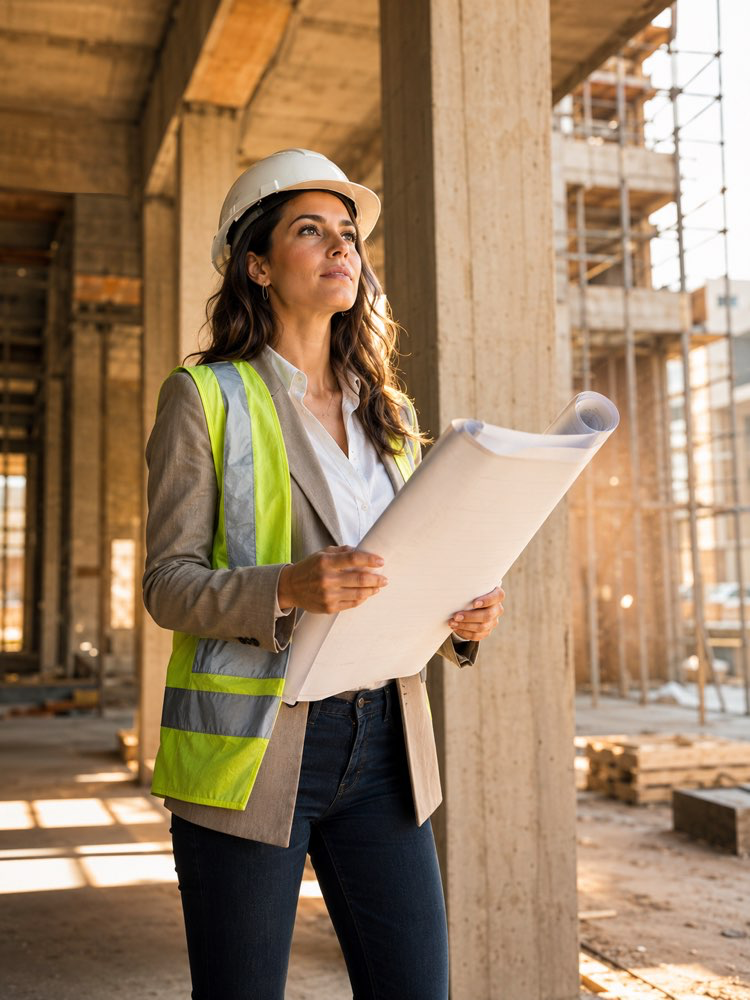
Professional Architect Photo on Site
Prompt
Architect on site portrait, construction professional photography.
Identity: preserve the person's face and identity from the uploaded photo — only transform wardrobe, scene and lighting.
Scene: an architect/engineer portrait bridging creativity and execution — at a construction site or unfinished architectural space, holding rolled plans or a tablet, vision meeting reality.
Details:
- Wardrobe: smart work attire with white hard hat and reflective vest worn stylishly OR elegant architect all-black with hard hat under the arm
- Environment: dramatic unfinished space — concrete columns, golden light beams through openings, scaffolding depth, dust particles in light
- Pose: choose — reviewing plans with focus, pointing toward the structure explaining, or composed with arms crossed against the raw concrete
- Light: natural construction-site light — sun shafts through the structure, warm dust atmosphere
- Expression: visionary confidence — someone who sees the finished building already
- Grade: warm concrete tones, cinematic construction ambiance
- Style: architecture firm profile photography, editorial, ultra realistic, 8K
Composition: vertical 3:4, 3/4 body, structural lines leading to the subject.
How to use
Create the professional architect photo on site from a simple selfie, with the editorial mood of a building site. It works in Gemini, in NanoBanana and in ChatGPT, which preserve your face and transform only wardrobe, scene and light. 1. Send a photo of your face together with the prompt and repeat the request to keep your features. 2. Let the AI rebuild the setting: an unfinished space with concrete columns, golden light beams and scaffolding in the background. 3. Choose the look between technical gear with a white hard hat and reflective vest, or the elegant architect dressed all in black. 4. Set the pose between reviewing the plans in concentration, pointing at the structure to explain, or arms crossed against the concrete. 5. Generate the image and check that the hard hat and the plans in your hand came out natural. Tip: engineers, site managers and interior designers use it too; swap the setting for "renovated interior site".
Works with
ChatGPT
Gemini
NanoBanana
Rate this prompt
📖 From the Prompteiro blog
See all posts →
Job Interview Simulator With AI: How to RehearseText · September 24, 2026

Travel Itineraries With AI: The Guide That WorksText · September 21, 2026

Travel Photo Prompts: You Anywhere in the WorldImages · September 19, 2026

Professional Product Photos With AI: The GuideImages · September 15, 2026

How to Care for Plants With AI: A Black Thumb’s GuideText · September 14, 2026

Decorate Your Home With AI: From Photo to PlanImages · September 11, 2026

Try a Haircut With AI Before You Actually CutImages · September 9, 2026

Colourise Black and White Photos With AI: A GuideImages · September 7, 2026

AI Headshots for LinkedIn: The Complete GuideImages · September 4, 2026