Prompt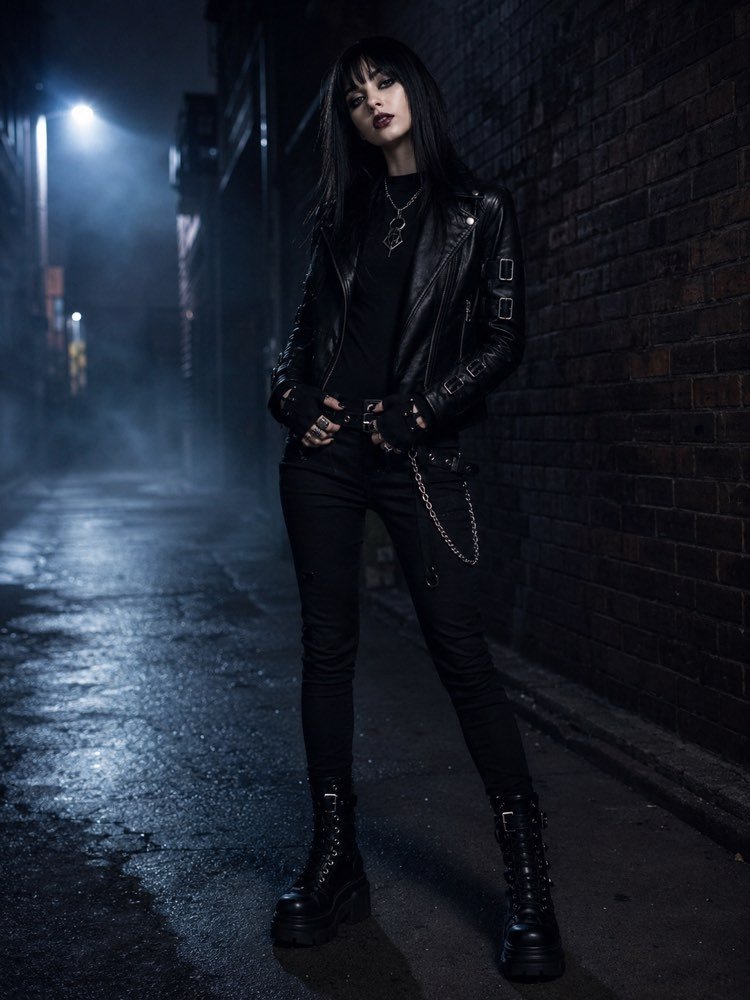
Alternative Gothic Look in Your Photo With AI
Prompt
{
"instruction": "Send a full-body or 3/4 photo of yourself, in good light, and generate the image preserving your face and your body completely.",
"look": "dress the person in a striking alternative gothic look, a black leather jacket with silver buckle details, a black T-shirt underneath, black skinny trousers with discreet chains, high black lace-up boots and fingerless gloves; add silver rings, a chain necklace with a geometric pendant and dark eye make-up, all in generic unbranded pieces",
"preserve": "keep the face, the skin tone, the hair and the body type identical; change only the clothing and the setting",
"setting": "an urban alley at night with dark brick walls, light mist and cold bluish street-lamp lighting in the background",
"style": "Realistic fashion photography, full body or 3/4, natural light, high definition, 3:4 ratio (portrait).",
"negative": "no distorting the face or the body, no changing the identity, no text, no watermark, no real brand logos"
}
How to use
Put on a striking alternative gothic look on your own photo using AI. This prompt works in the image generators that accept a reference photo, such as Gemini, NanoBanana and ChatGPT. 1. Take a full-body or 3/4 photo of yourself, in good light, keeping your face and body clearly visible. 2. Send the photo along with the full text of this prompt in the image generator you use. 3. Ask it to keep your face, your skin tone, your hair and your body type identical, changing only the clothing and the setting. 4. Check the pieces: leather jacket with buckles, black skinny trousers, high lace-up boots and fingerless gloves in the urban alley. 5. Adjust the metal accessories or the cold lighting of the setting and generate new variations. 6. Save the image where the gothic aesthetic looks most coherent. Tip: a light mist and the bluish street-lamp light reinforce the nocturnal, alternative mood.
Works with
ChatGPT
Gemini
NanoBanana
Rate this prompt
📖 From the Prompteiro blog
See all posts →
Job Interview Simulator With AI: How to RehearseText · September 24, 2026

Travel Itineraries With AI: The Guide That WorksText · September 21, 2026

Travel Photo Prompts: You Anywhere in the WorldImages · September 19, 2026

Professional Product Photos With AI: The GuideImages · September 15, 2026

How to Care for Plants With AI: A Black Thumb’s GuideText · September 14, 2026

Decorate Your Home With AI: From Photo to PlanImages · September 11, 2026

Try a Haircut With AI Before You Actually CutImages · September 9, 2026

Colourise Black and White Photos With AI: A GuideImages · September 7, 2026

AI Headshots for LinkedIn: The Complete GuideImages · September 4, 2026