Prompt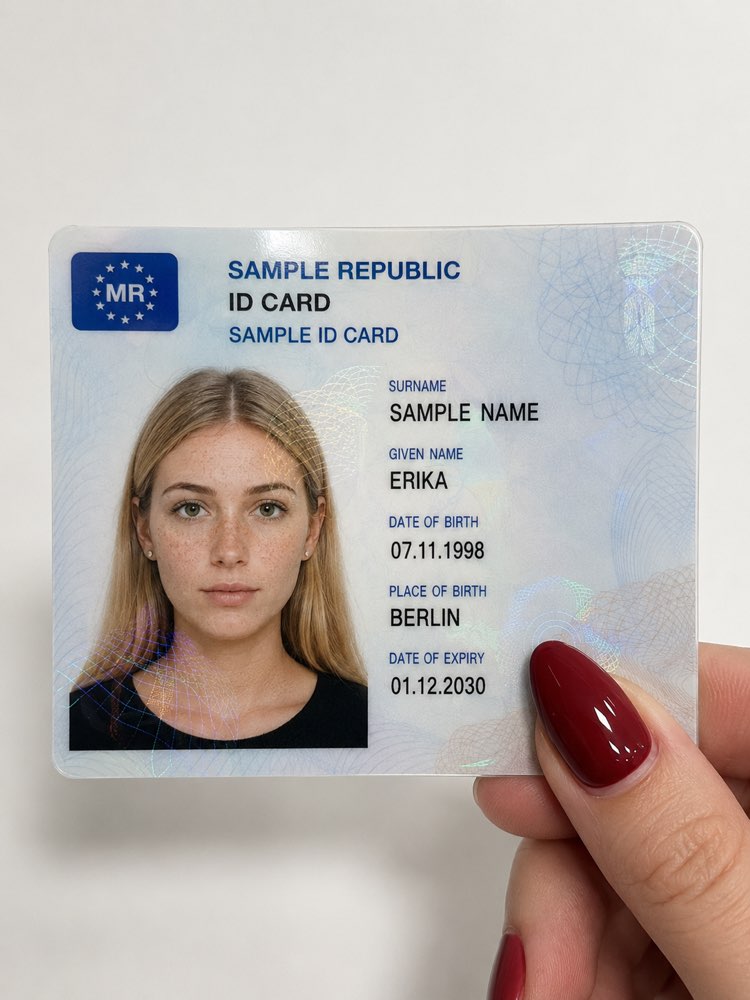
Fictional ID Card in Hand: the Viral TikTok Effect
Prompt
{
"type": "Close-up photography",
"subject": "A fictional ID card held by a hand",
"card_content": {
"header_text": "SAMPLE REPUBLIC / ID CARD / SAMPLE ID CARD",
"logo": "A blue symbol field in the upper left with the country code 'MR'",
"portrait": {
"appearance": "Young woman with long, straight blonde hair and center parting",
"facial_features": "Fair skin with clearly visible natural freckles on nose and cheeks, neutral facial expression, hazel green eyes with a straight gaze forward",
"clothing": "Black top with visible neckline",
"accessories": "Small silver ear studs on the earlobes"
},
"text_data": {
"surname": "SAMPLE NAME",
"given_name": "ERIKA",
"birth_date": "07.11.1998",
"birth_place": "BERLIN",
"expiry_date": "01.12.2030"
},
"surface_texture": "Shiny laminated surface with visible holographic security patterns and guilloche lines over the portrait and text"
},
"foreground_hand": {
"position": "Holding the lower right corner of the card",
"skin_tone": "Fair",
"fingernail": "Visible thumb with long, almond-shaped fingernail, painted in glossy Bordeaux red or dark red"
},
"background": "Plain, single-color white surface",
"lighting": "Soft, even indoor lighting with slight reflections on the card surface and the glossy nail polish",
"framing": "Vertical close-up from a bird's-eye view, fully focused on the card and the thumb"
}
How to use
The fictional ID card in hand effect creates a hyper-realistic close-up of a stylised identity card, the aesthetic that went viral on TikTok, and it runs in NanoBanana, in Gemini or in ChatGPT. 1. Send your photo along with the prompt in the same message so the portrait on the card uses your face, or send only the prompt to generate the fictional person described. 2. The AI returns the laminated card held by the hand, with a hologram, security lines and realistic shine. 3. Customise "text_data" with a name, a date and a place of birth that are clearly fictional. 4. Adjust "portrait" to change the appearance and "fingernail" to swap the colour of the nail polish. 5. Change "background" if you want another backdrop instead of the plain white. 6. Generate the image and check that every text is still sample data. Tip: always keep the data fictional, because the prompt is for art and content, never to imitate real documents.
Works with
ChatGPT
Gemini
NanoBanana
Rate this prompt
📋 Featured in these lists

📖 From the Prompteiro blog
See all posts →
Job Interview Simulator With AI: How to RehearseText · September 24, 2026

Travel Itineraries With AI: The Guide That WorksText · September 21, 2026

Travel Photo Prompts: You Anywhere in the WorldImages · September 19, 2026

Professional Product Photos With AI: The GuideImages · September 15, 2026

How to Care for Plants With AI: A Black Thumb’s GuideText · September 14, 2026

Decorate Your Home With AI: From Photo to PlanImages · September 11, 2026

Try a Haircut With AI Before You Actually CutImages · September 9, 2026

Colourise Black and White Photos With AI: A GuideImages · September 7, 2026

AI Headshots for LinkedIn: The Complete GuideImages · September 4, 2026