 Prompt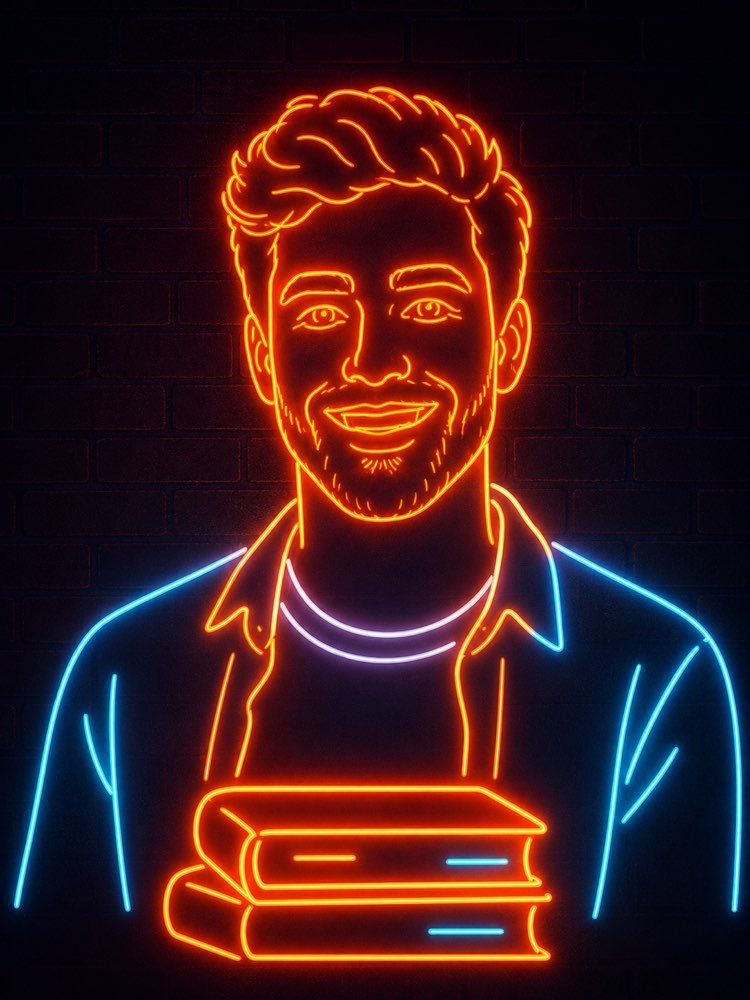
Transforme sua Foto em Letreiro Neon com IA
Prompt
{
"task": "photo_to_neon_line_art_portrait",
"version": "1.0",
"preserve_identity": {
"enabled": true,
"identity_strength": 1.0,
"preserve_face": true,
"preserve_hairstyle": true,
"preserve_facial_structure": true,
"preserve_expression": true,
"preserve_age": true,
"preserve_gender_presentation": true,
"preserve_distinctive_features": true
},
"transformation": {
"style": "minimalist neon sign",
"description": "Transform the input portrait into a clean neon tube illustration composed entirely of continuous glowing neon lines while preserving the person's identity. The final result should resemble a professionally manufactured neon wall sign."
},
"composition": {
"camera_angle": "front-facing",
"crop": "medium portrait",
"framing": "centered",
"orientation": "vertical",
"head_position": "center",
"shoulders_visible": true,
"upper_torso_visible": true,
"maintain_original_pose": true,
"background": {
"type": "dark brick wall",
"color": "#0d0714",
"texture": "subtle matte bricks",
"depth": "flat"
}
},
"subject": {
"outline_method": "single continuous neon tubes",
"line_simplification": "high",
"facial_details": {
"eyes": "minimal but recognizable",
"eyebrows": "clean neon strokes",
"nose": "simple contour",
"mouth": "single smiling outline",
"ears": "minimal contours"
},
"hair": {
"convert_to_neon": true,
"preserve_shape": true,
"simplify_strands": true,
"flowing_contours": true
},
"clothing": {
"simplify_to_outline": true,
"preserve_general_garment_shape": true,
"remove_small_details": true
}
},
"foreground_object": {
"enabled": true,
"object": "stack of books",
"position": "centered in front of chest",
"style": "matching neon outline",
"perspective": "slightly frontal",
"line_weight": "consistent",
"book_count": 2
},
"neon_design": {
"tube_style": "rounded glass neon tubes",
"continuous_lines": true,
"line_breaks": "minimal",
"uniform_tube_width": true,
"tube_thickness": "medium",
"corner_style": "rounded",
"manufacturable_layout": true
},
"color_palette": {
"primary": {
"color": "warm orange",
"hex": "#ff7a00",
"usage": [
"face",
"hair",
"neck",
"books",
"outer clothing edges"
]
},
"secondary": {
"color": "cool cyan",
"hex": "#47d9ff",
"usage": [
"selected clothing accents",
"book details"
]
},
"accent": {
"color": "white with slight lavender tint",
"hex": "#f4f0ff",
"usage": [
"shirt collar"
]
}
},
"lighting": {
"style": "realistic neon emission",
"scene": "dark environment",
"glow_intensity": "high",
"bloom": "strong",
"soft_light_spill": true,
"light_wrap": true,
"subtle_wall_reflection": true,
"ambient_light": "very low",
"contrast": "high"
},
"materials": {
"neon_tubes": "glass",
"wall": "painted brick",
"surface_finish": "matte"
},
"rendering": {
"style": "photorealistic neon installation",
"not_flat_vector": true,
"depth": "subtle",
"realistic_glass": true,
"emissive_effect": true,
"clean_edges": true
},
"quality": {
"resolution": "8K",
"sharpness": "high",
"noise": "none",
"banding": "none",
"compression": "none",
"anti_aliasing": true,
"professional_finish": true
},
"preserve": [
"facial proportions",
"head shape",
"hair silhouette",
"expression",
"pose",
"overall identity"
],
"negative_prompt": [
"extra people",
"missing facial features",
"distorted face",
"wrong identity",
"deformed anatomy",
"crossed neon tubes",
"broken neon",
"floating elements",
"text",
"logos",
"watermark",
"background clutter",
"photographic skin texture",
"painting",
"anime",
"cartoon",
"3D character",
"low resolution",
"pixelation",
"blur",
"double outlines",
"multiple faces",
"overly detailed clothing",
"random decorations",
"oversaturated colors",
"harsh shadows",
"uneven glow"
]
}
Como usar
O retrato em letreiro neon transforma a sua foto em uma arte minimalista de tubos luminosos sobre parede de tijolos, com cara de placa profissional, e funciona no NanoBanana, no Gemini ou no ChatGPT. 1. Envie a foto da pessoa junto do prompt na mesma mensagem. 2. A IA recria o rosto com linhas de neon contínuas, preservando a identidade e a expressão originais. 3. Ajuste "color_palette" para definir as cores dos tubos, como laranja quente e ciano. 4. Use "foreground_object" para trocar ou remover a pilha de livros à frente do peito. 5. Modifique "composition" e "background" para mudar o enquadramento e o fundo escuro. 6. Controle o brilho em "lighting" e gere a imagem final. Dica: fotos com o rosto bem iluminado e de frente geram contornos de neon mais limpos e reconhecíveis.
Avalie este prompt
📖 Do blog do Prompteiro
Ver todos os posts →
Receita com o que tem em casa: o método certoTexto · 24 de outubro de 2026

Prompt para Instagram: o que pedir em cada formatoTexto · 11 de outubro de 2026

Prompt para foto de criança: o guia honestoImagens · 4 de outubro de 2026

Decoração de festa com IA: do tema ao orçamentoImagens · 2 de outubro de 2026

Simulador de entrevista de emprego com IATexto · 24 de setembro de 2026

Roteiro de viagem com IA: o guia que evita o erroTexto · 21 de setembro de 2026

Prompt para foto de viagem: você em qualquer lugarImagens · 19 de setembro de 2026

Foto profissional de produto com IA: o guiaImagens · 15 de setembro de 2026

Como cuidar de plantas com IA: o guia de quem mataTexto · 14 de setembro de 2026