 Prompt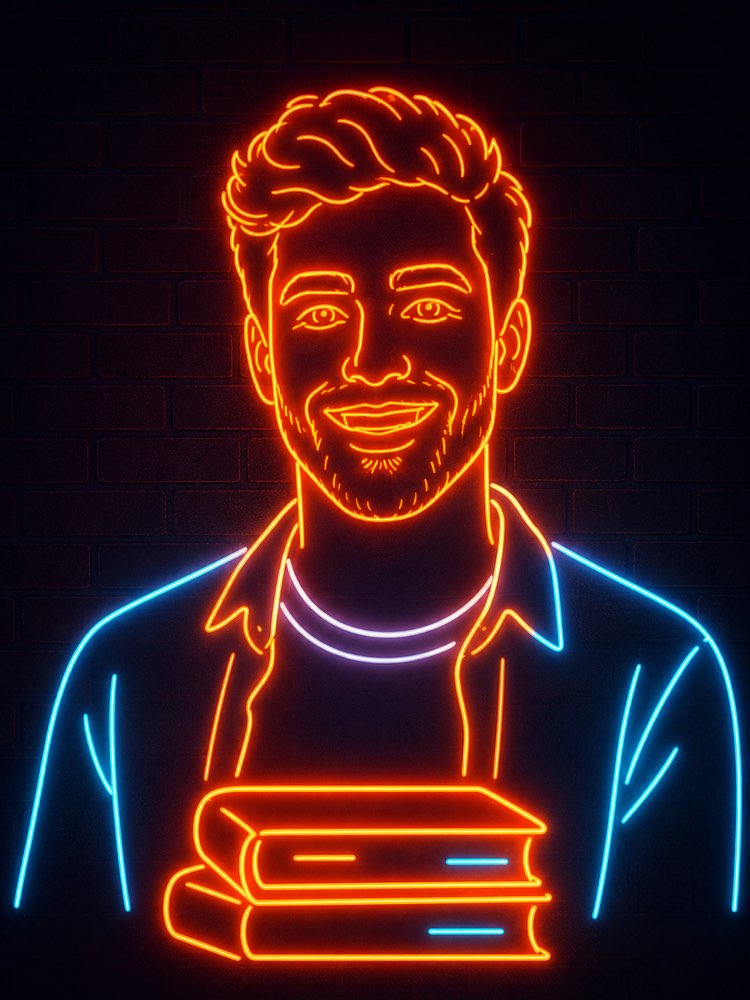
写真をネオンの看板に変える(AI)
プロンプト
{
"task": "写真からネオンの線のポートレートへ",
"version": "1.0",
"preserve_identity": {
"enabled": true,
"identity_strength": 1.0,
"preserve_face": true,
"preserve_hairstyle": true,
"preserve_facial_structure": true,
"preserve_expression": true,
"preserve_age": true,
"preserve_gender_presentation": true,
"preserve_distinctive_features": true
},
"transformation": {
"style": "ミニマルなネオン看板",
"description": "入力のポートレートを、途切れずに光るネオンの線だけでできた、すっきりしたネオン管のイラストに変えること。人物の同一性は保つこと。仕上がりは、プロが製作した壁掛けのネオン看板に見えること。"
},
"composition": {
"camera_angle": "正面",
"crop": "ミディアムポートレート",
"framing": "中央",
"orientation": "縦",
"head_position": "中央",
"shoulders_visible": true,
"upper_torso_visible": true,
"maintain_original_pose": true,
"background": {
"type": "暗いレンガの壁",
"color": "#0d0714",
"texture": "控えめなマットのレンガ",
"depth": "平坦"
}
},
"subject": {
"outline_method": "途切れない一本のネオン管",
"line_simplification": "高い",
"facial_details": {
"eyes": "最小限だが分かる",
"eyebrows": "きれいなネオンの線",
"nose": "単純な輪郭",
"mouth": "微笑む一本の輪郭",
"ears": "最小限の輪郭"
},
"hair": {
"convert_to_neon": true,
"preserve_shape": true,
"simplify_strands": true,
"flowing_contours": true
},
"clothing": {
"simplify_to_outline": true,
"preserve_general_garment_shape": true,
"remove_small_details": true
}
},
"foreground_object": {
"enabled": true,
"object": "積んだ本",
"position": "胸の前の中央",
"style": "そろえたネオンの輪郭",
"perspective": "やや正面",
"line_weight": "一定",
"book_count": 2
},
"neon_design": {
"tube_style": "角の丸いガラスのネオン管",
"continuous_lines": true,
"line_breaks": "最小限",
"uniform_tube_width": true,
"tube_thickness": "中",
"corner_style": "丸め",
"manufacturable_layout": true
},
"color_palette": {
"primary": {
"color": "暖かなオレンジ",
"hex": "#ff7a00",
"usage": [
"顔",
"髪",
"首",
"本",
"服の外側の縁"
]
},
"secondary": {
"color": "冷たいシアン",
"hex": "#47d9ff",
"usage": [
"選んだ服のアクセント",
"本のディテール"
]
},
"accent": {
"color": "ほのかにラベンダーがかった白",
"hex": "#f4f0ff",
"usage": [
"シャツの襟"
]
}
},
"lighting": {
"style": "リアルなネオンの発光",
"scene": "暗い環境",
"glow_intensity": "高い",
"bloom": "強い",
"soft_light_spill": true,
"light_wrap": true,
"subtle_wall_reflection": true,
"ambient_light": "ごく弱い",
"contrast": "高い"
},
"materials": {
"neon_tubes": "ガラス",
"wall": "塗装したレンガ",
"surface_finish": "マット"
},
"rendering": {
"style": "写実的なネオンのインスタレーション",
"not_flat_vector": true,
"depth": "控えめ",
"realistic_glass": true,
"emissive_effect": true,
"clean_edges": true
},
"quality": {
"resolution": "8K",
"sharpness": "高い",
"noise": "なし",
"banding": "なし",
"compression": "なし",
"anti_aliasing": true,
"professional_finish": true
},
"preserve": [
"顔の比率",
"頭の形",
"髪のシルエット",
"表情",
"ポーズ",
"全体の同一性"
],
"negative_prompt": [
"余分な人物",
"欠けた顔のパーツ",
"崩れた顔",
"取り違えた同一性",
"崩れた解剖",
"交差したネオン管",
"割れたネオン",
"浮いた要素",
"文字",
"ロゴ",
"透かし",
"散らかった背景",
"写真のような肌の質感",
"絵画",
"アニメ",
"カートゥーン",
"3Dキャラクター",
"低解像度",
"画素の粗さ",
"ぼけ",
"二重の輪郭",
"複数の顔",
"細かすぎる服",
"脈絡のない装飾",
"彩度過多の色",
"硬い影",
"むらのある発光"
]
}
使い方
ネオン看板のポートレートは、あなたの写真を途切れない光の管のイラストに変えます。レンガの壁に掛けるために作られた看板のように。NanoBanana、Gemini、ChatGPTで動きます。 1. 画像ツールを開き、新しい会話を始めます。 2. 正面から、顔と肩まで写った、顔のはっきりした写真を送ります。 3. JSONプロンプト全体を、写真と同じメッセージに貼り付けます。 4.「color_palette」の16進の色を、看板に使いたい二色に変えます。 5.「foreground_object」の積んだ本を、もっとあなたらしいものに差し替えます。 6. 看板を生成し、いちばん多い失敗である管の交差がないか確かめます。 ヒント: プロンプトは意図的に「作れる配置」を求めています。だから結果は、光る落書きではなく、ありうる看板になります。
対応ツール
ChatGPT
Gemini
NanoBanana
このプロンプトを評価
📖 Prompteiroブログから
すべての記事を見る →
AIで旅程を作る:失敗しない頼み方の手引きテキスト · 2026年9月21日

旅の写真プロンプト:世界のどこにでも自分を画像 · 2026年9月19日

AIで作るプロ品質の商品写真 完全ガイド画像 · 2026年9月15日

AIで観葉植物を育てる:枯らす人のための手引きテキスト · 2026年9月14日

AIで部屋を模様替えする:写真から計画まで画像 · 2026年9月11日

切る前にAIで髪型をシミュレーションする方法画像 · 2026年9月9日

白黒写真をAIで色付けする完全ガイド画像 · 2026年9月7日

LinkedInのプロフィール写真をAIで作る完全ガイド画像 · 2026年9月4日

ペット写真のプロンプト:一発で似せるコツ画像 · 2026年9月1日