Prompt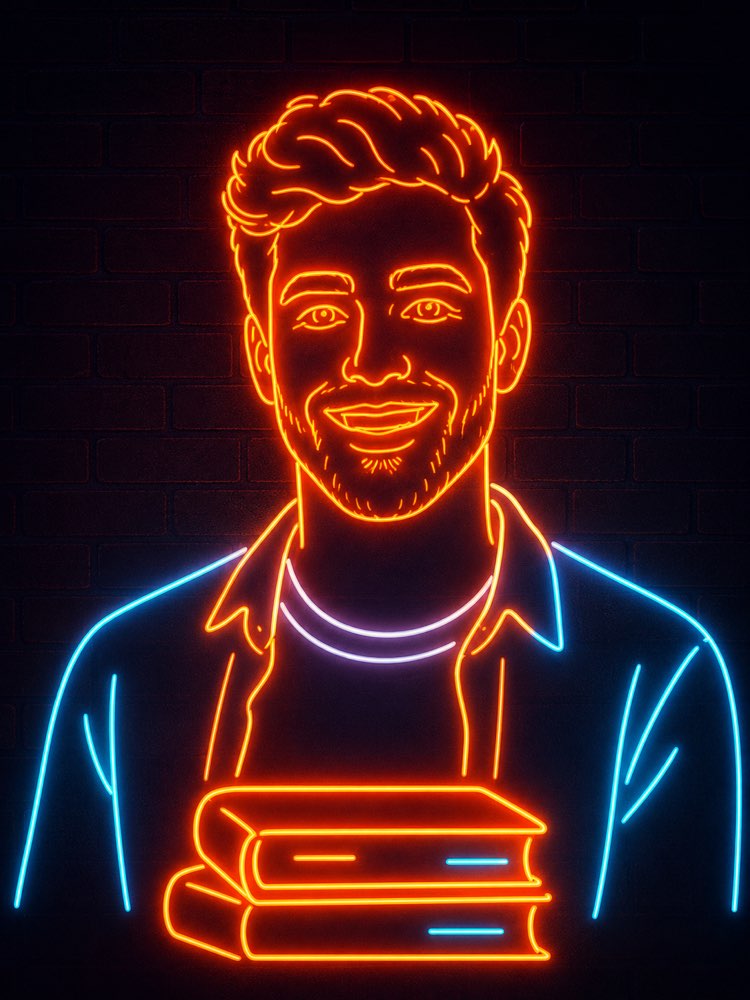
Turn Your Photo into a Neon Sign with AI
Prompt
{
"task": "photo_to_neon_line_art_portrait",
"version": "1.0",
"preserve_identity": {
"enabled": true,
"identity_strength": 1.0,
"preserve_face": true,
"preserve_hairstyle": true,
"preserve_facial_structure": true,
"preserve_expression": true,
"preserve_age": true,
"preserve_gender_presentation": true,
"preserve_distinctive_features": true
},
"transformation": {
"style": "minimalist neon sign",
"description": "Transform the input portrait into a clean neon tube illustration composed entirely of continuous glowing neon lines while preserving the person's identity. The final result should resemble a professionally manufactured neon wall sign."
},
"composition": {
"camera_angle": "front-facing",
"crop": "medium portrait",
"framing": "centered",
"orientation": "vertical",
"head_position": "center",
"shoulders_visible": true,
"upper_torso_visible": true,
"maintain_original_pose": true,
"background": {
"type": "dark brick wall",
"color": "#0d0714",
"texture": "subtle matte bricks",
"depth": "flat"
}
},
"subject": {
"outline_method": "single continuous neon tubes",
"line_simplification": "high",
"facial_details": {
"eyes": "minimal but recognizable",
"eyebrows": "clean neon strokes",
"nose": "simple contour",
"mouth": "single smiling outline",
"ears": "minimal contours"
},
"hair": {
"convert_to_neon": true,
"preserve_shape": true,
"simplify_strands": true,
"flowing_contours": true
},
"clothing": {
"simplify_to_outline": true,
"preserve_general_garment_shape": true,
"remove_small_details": true
}
},
"foreground_object": {
"enabled": true,
"object": "stack of books",
"position": "centered in front of chest",
"style": "matching neon outline",
"perspective": "slightly frontal",
"line_weight": "consistent",
"book_count": 2
},
"neon_design": {
"tube_style": "rounded glass neon tubes",
"continuous_lines": true,
"line_breaks": "minimal",
"uniform_tube_width": true,
"tube_thickness": "medium",
"corner_style": "rounded",
"manufacturable_layout": true
},
"color_palette": {
"primary": {
"color": "warm orange",
"hex": "#ff7a00",
"usage": [
"face",
"hair",
"neck",
"books",
"outer clothing edges"
]
},
"secondary": {
"color": "cool cyan",
"hex": "#47d9ff",
"usage": [
"selected clothing accents",
"book details"
]
},
"accent": {
"color": "white with slight lavender tint",
"hex": "#f4f0ff",
"usage": [
"shirt collar"
]
}
},
"lighting": {
"style": "realistic neon emission",
"scene": "dark environment",
"glow_intensity": "high",
"bloom": "strong",
"soft_light_spill": true,
"light_wrap": true,
"subtle_wall_reflection": true,
"ambient_light": "very low",
"contrast": "high"
},
"materials": {
"neon_tubes": "glass",
"wall": "painted brick",
"surface_finish": "matte"
},
"rendering": {
"style": "photorealistic neon installation",
"not_flat_vector": true,
"depth": "subtle",
"realistic_glass": true,
"emissive_effect": true,
"clean_edges": true
},
"quality": {
"resolution": "8K",
"sharpness": "high",
"noise": "none",
"banding": "none",
"compression": "none",
"anti_aliasing": true,
"professional_finish": true
},
"preserve": [
"facial proportions",
"head shape",
"hair silhouette",
"expression",
"pose",
"overall identity"
],
"negative_prompt": [
"extra people",
"missing facial features",
"distorted face",
"wrong identity",
"deformed anatomy",
"crossed neon tubes",
"broken neon",
"floating elements",
"text",
"logos",
"watermark",
"background clutter",
"photographic skin texture",
"painting",
"anime",
"cartoon",
"3D character",
"low resolution",
"pixelation",
"blur",
"double outlines",
"multiple faces",
"overly detailed clothing",
"random decorations",
"oversaturated colors",
"harsh shadows",
"uneven glow"
]
}
How to use
The neon sign portrait turns your photo into a continuous glowing tube illustration, like a sign made to hang on a brick wall. It works in NanoBanana, Gemini and ChatGPT. 1. Open the image tool and start a new conversation. 2. Send a front-facing photo, head and shoulders, with your face sharp. 3. Paste the full JSON prompt in the same message as the photo. 4. Change the hex colours in "color_palette" to the two tones you want in the sign. 5. Swap the object in "foreground_object" — the stack of books — for something that says more about you. 6. Generate the sign and check for crossed tubes, the most common flaw. Tip: the prompt asks for a manufacturable layout on purpose, so the result is a plausible sign rather than a glowing scribble.
Works with
ChatGPT
Gemini
NanoBanana
Rate this prompt
📖 From the Prompteiro blog
See all posts →
Best ChatGPT Prompts in English: 12 to Use TodayText · August 2, 2026
Restore an Old Photo with AI: The Complete Free GuideImages · August 2, 2026

How to Write a Prompt That Works in ChatGPTCourses · August 2, 2026

AI Prompts for Work and Career: 12 That Actually HelpText · August 1, 2026

How to Write an Image Prompt That Works (With Examples)Images · August 1, 2026

What Is Artificial Intelligence: The Beginner’s GuideCourses · August 1, 2026